Where to get the template
In Xero, go to Sales › Invoices › Import and download the template file. Use Xero's headings exactly as they are, including the asterisks: a file whose headings differ is rejected.
The 27 columns
| Column | Required | What goes in it |
|---|---|---|
| *ContactName | Yes | The customer, written exactly as the contact is named in Xero |
| EmailAddress | No | Contact email |
| POAddressLine1 – POAddressLine4, POCity, PORegion, POPostalCode, POCountry | No | Postal address of the contact |
| *InvoiceNumber | Yes | Your invoice number; every row with the same number is one invoice |
| Reference | No | A good place for the customer's purchase order number |
| *InvoiceDate | Yes | Date in your organisation's format (day/month/year in Australia) |
| *DueDate | Yes | Same format as the invoice date |
| InventoryItemCode | No | An item code from Xero's inventory (see the warning below) |
| *Description | Yes | The line description |
| *Quantity | Yes | Quantity on the line |
| *UnitAmount | Yes | Price per unit |
| Discount | No | Line discount |
| *AccountCode | Yes | Revenue account, for example 200 (Sales) in Xero's standard chart of accounts |
| *TaxType | Yes | The name of a tax rate in your organisation, for example GST on Income |
| TrackingName1, TrackingOption1, TrackingName2, TrackingOption2 | No | Tracking categories, if you use them |
| Currency | No | Only for multi-currency organisations |
| BrandingTheme | No | Name of an invoice branding theme |
Four details that decide whether the import works
Dates follow your organisation's region.
For an Australian organisation, the import page says dates are assumed to be in English (Australia) format, for example 25/12/2026 or 25 Dec 2026. Organisations in other regions see their own format in the same note. If you prepare the file in a spreadsheet set to US dates, check the column before saving as CSV.
Tax type is a name, not a percentage.
*TaxType must match a tax rate's name as it appears in Settings › Tax rates. In an Australian organisation the standard rate is GST on Income. UK organisations use the name of their VAT rate. A name Xero does not recognise stops the import.
Choose tax exclusive or inclusive at import.
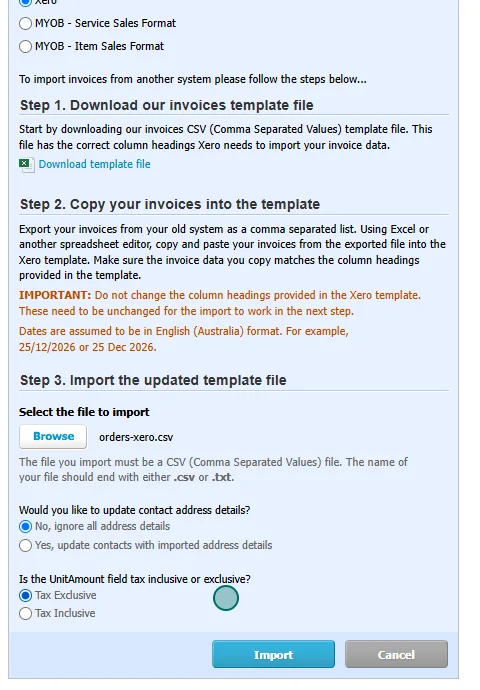
When you upload the file, Xero asks whether the UnitAmount field is tax exclusive or tax inclusive. If your unit prices exclude GST or VAT, choose Tax Exclusive; otherwise every line total is off by the tax.
 Fictional sample data
Step 3 of Xero's import page: the file chosen and Tax Exclusive selected. Item codes create items.
If you fill InventoryItemCode with a code Xero does not know, Xero creates a new inventory item with that code (checked in our Xero test organisation, October 2026). Only fill this column when your product codes come from Xero itself; otherwise leave it empty and put the code in the description.
One invoice, several lines
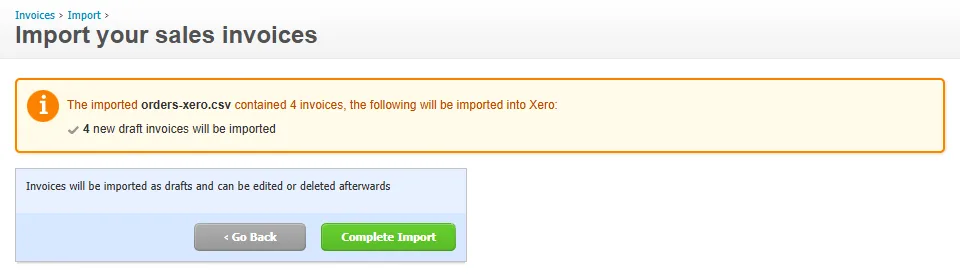
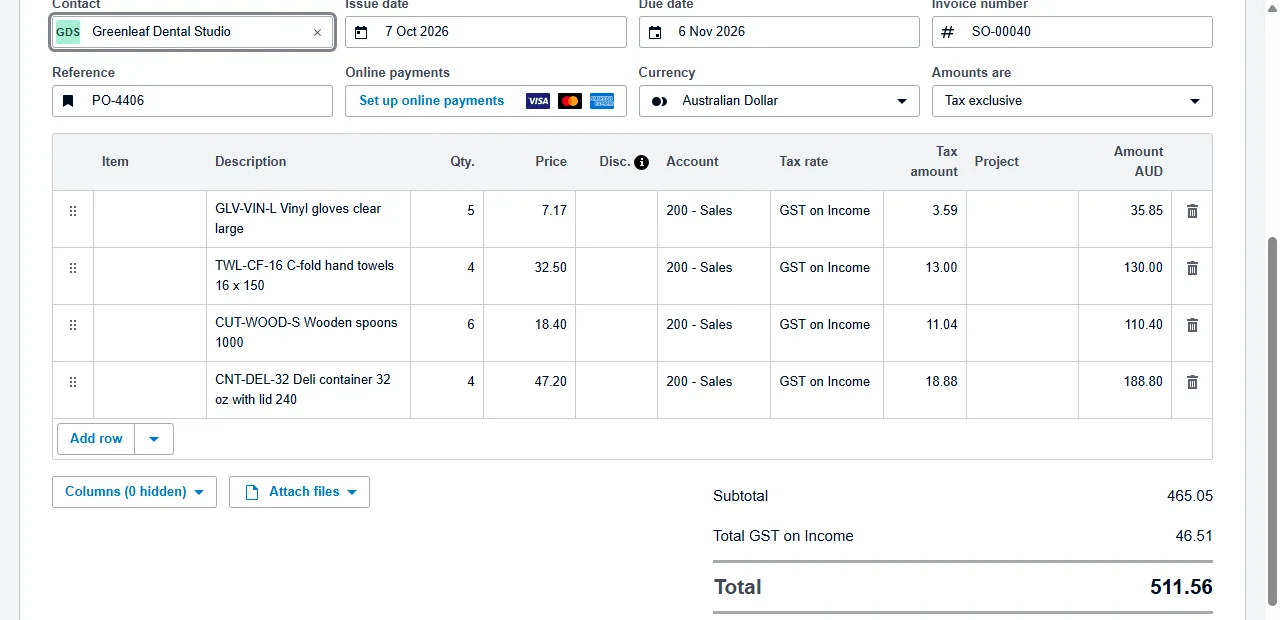
Xero groups rows by *InvoiceNumber. A purchase order with five products is five rows with the same invoice number, the same contact and the same dates, and a different description, quantity and unit amount on each row.
*ContactName,*InvoiceNumber,Reference,*InvoiceDate,*DueDate,*Description,*Quantity,*UnitAmount,*AccountCode,*TaxType
Harbor Lane Cafe,SO-00001,7300,01/10/2026,15/10/2026,CUP-HOT-8 Hot cup 8 oz white 1000,10,41.00,200,GST on Income
Harbor Lane Cafe,SO-00001,7300,01/10/2026,15/10/2026,FILM-18 Cling film roll 18 in 2000 ft,4,24.30,200,GST on Income
 Fictional sample data
Common mistakes
- Edited headings. Renamed, removed or reordered columns: start again from Xero's template.
- Contact names that almost match. Xero matches *ContactName to an existing contact by name; a name it does not know becomes a new contact. So "Harbor Lane Cafe" and "Harbor Lane Café" end up as two contacts. Copy names exactly as they appear in Xero.
- Spreadsheet formulas. A description starting with =, +, - or @ can be read as a formula when the file is opened in Excel. Prefix such cells with an apostrophe.
- Wrong tax setting at upload. Totals off by exactly 10% (GST) or 20% (VAT) usually mean tax exclusive/inclusive was chosen wrongly.
 Fictional sample data
Getting purchase orders into this format
If your invoices start as customer purchase orders (PDFs, emails, spreadsheets), someone has to read each one and fill these columns. SYSLUME Order Intake reads the orders, checks every line against your own catalogue and customer list, and, after a person approves each order, exports this file ready for Xero's import. You can download a sample Xero file from the demo.
For the other ways to get purchase orders into Xero, and when each one makes sense, see How to turn customer purchase orders into Xero invoices.
Questions
Does the Xero import create approved invoices?
No. Imported sales invoices arrive as drafts. You review and approve them in Xero.
Can one file hold many invoices?
Yes. Each distinct *InvoiceNumber becomes its own invoice.
What account code should I use?
The revenue account the sale belongs to. In Xero's standard chart of accounts, 200 is Sales; check your own chart under Accounting › Chart of accounts.
Why does my import fail on tax type?
The value must be the exact name of a tax rate in your organisation, not a percentage.
Try it with your own orders
Order Intake reads customer purchase orders and writes this file for you. Free for 30 days or 100 orders, no card.