What makes it hard: matching, not typing
A customer's purchase order is written in the customer's words, not yours. "Clear vinyl gloves L" has to become your product GLV-VIN-L; "KSK" has to become your customer Kestrel Street Kitchen; a price of 7.17 has to be noticed when your price is 6.40. Copying the text is the easy part. Matching it to your own catalogue and catching what does not match is the real work.
Option 1: type them into Xero
Open the order, create a sales invoice, pick the contact, add each line.
- Good for: a handful of orders a week.
- Watch out for: wrong product codes, wrong quantities and missed price differences, which surface later as wrong shipments or credit notes. It also piles up at month end.
Option 2: build an automation (Make, Zapier, email and document parsers)
A common pattern: forward order emails to a parser, extract fields with rules or templates, then create the contact and invoice in Xero through an automation tool. Make publishes a tutorial for exactly this flow with order emails and Google Sheets; Mailparser and Docparser connect to Xero through Integrately and Zapier.
- Good for: orders that always arrive in the same layout, for example from your own web shop.
- Watch out for: every new customer layout needs a new parsing rule; rule-based parsers work from text, so scanned PDFs and photos need extra steps; and the automation creates whatever it extracted. Unless you add your own checks, a misread code or price goes straight into Xero.
Option 3: a purpose-built purchase order tool
A tool designed for this job reads the order whatever its layout, matches each line to your catalogue and customer list, flags what does not fit and waits for a person to approve.
SYSLUME Order Intake works this way:
Forward order emails to a private address, or upload PDFs, Excel files, scans and photos.
Each line is matched to your own catalogue; unknown products, wrong totals, duplicate PO numbers and prices that differ from your catalogue or from the price agreed with that customer are flagged.
A person reviews the order next to the original and approves it.
Approved orders download as a file for Xero's sales invoice import, where they arrive as draft invoices.
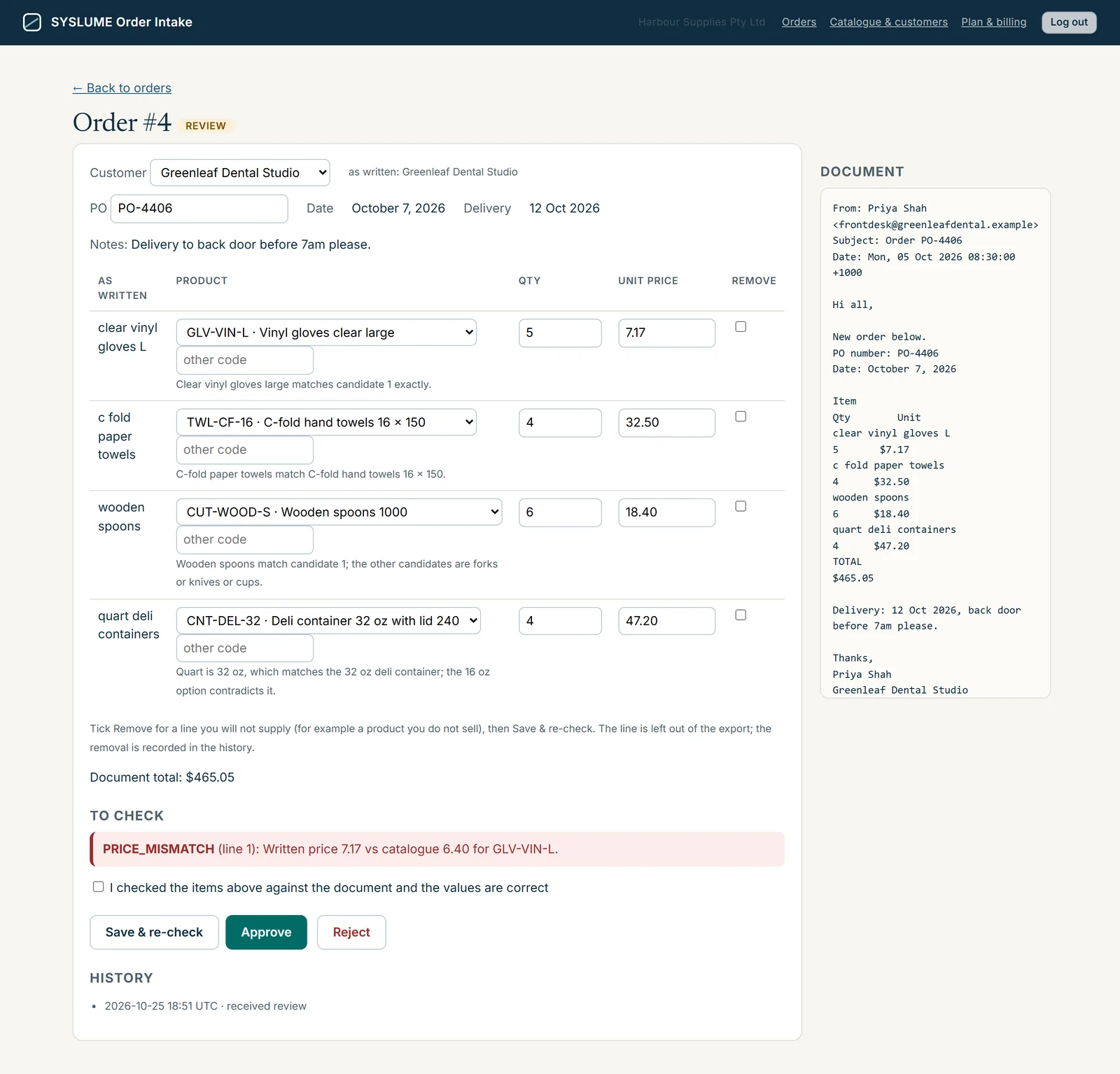 Fictional sample data
In our latest test on 300 fictional purchase orders (25 October 2026), none was marked ready with a wrong field; every mistake was flagged for a person. See the six-order demo and the walkthrough into Xero.
- Good for: wholesalers and distributors whose customers send orders in many layouts.
- Watch out for: it exports an import file rather than writing into Xero directly, so there is one upload step in Xero.
Side by side
| Type by hand | Build an automation | Purpose-built tool | |
|---|---|---|---|
| Setup | None | Build and test a rule for each layout | Import catalogue and customers once |
| New customer layouts | No change | New parsing rule each time | No change |
| Scans and photos | Read by a person | Extra steps | Read, always sent to review |
| Checks against your catalogue | By a person | Only if you build them | Built in |
| Approval before Xero | Implicit | Only if you build it | Every order |
Which one should you pick?
- Work out your own number first. Count last week's purchase orders and time a few of them. Orders × minutes each = hours of typing a week. For example, 40 orders at 4 minutes each is about 2 hours 40 minutes. Then add what last month's mistakes cost: credit notes, re-deliveries, a call to the customer.
- A handful of orders a week, few customers: typing is fine. Order Intake's smallest plan covers 150 orders a month (about 35 a week); well below that, it is hard to justify.
- One source, one fixed layout (your own web shop, one large customer's portal): an automation is a good fit.
- Many customers, many layouts, and mistakes that cost money: use a tool that checks every line against your catalogue and lets a person approve each order.
Questions
Can Xero read a purchase order PDF by itself?
Not as a sales invoice. Xero gives each organisation an email address for bills: forwarded emails with attached files become draft bills, which are purchases from your suppliers. The sales invoices screen has no such address, so a customer's purchase order is either typed in or imported from a file.
Do imported invoices go straight to customers?
No. Imported sales invoices arrive as drafts; you approve and send them from Xero.
Will a tool invent product codes?
Order Intake only uses codes from your own catalogue; anything it cannot match is flagged rather than guessed.
Try it with your own orders
Forward a week of real orders and see what gets flagged. Free for 30 days or 100 orders, no card, from US$39 a month after.